Summary#
RUBot is a Telegram bot built with NestJS that delivers the daily and weekly menu of UFPA’s university restaurant.
It scrapes the official RU website, formats the menu, and sends it through a user-friendly Telegram interface.
The project also exposes a private RESTful API for retrieving menus in JSON format.
GitHub repository:
Problem & Motivation#
At UFPA, the official university restaurant (RU) publishes its menu only on a static web page, which is not mobile-friendly and can be cumbersome for students to access daily.
RUBot was created to provide an easier way for students to check the menu through Telegram, a tool most already use daily.
Features#
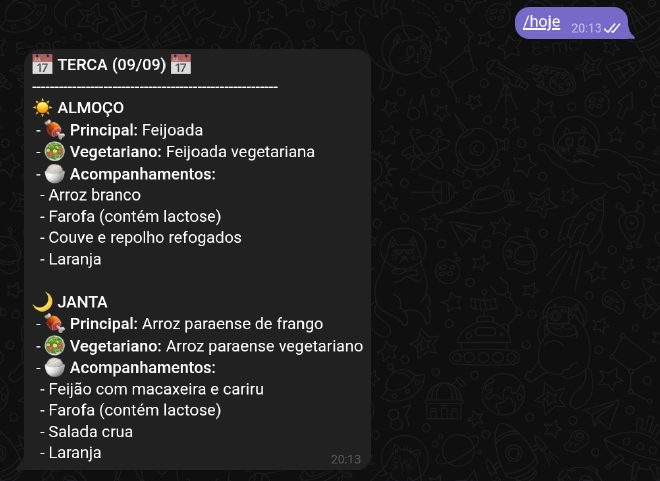
/hoje command showing the daily menu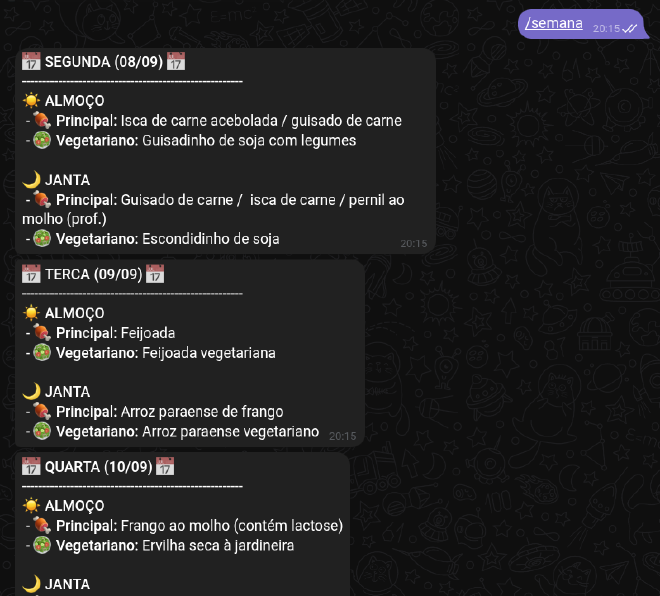
/semana command showing the weekly menuTelegram Bot#
- Built with Telegraf and nestjs-telegraf.
- Commands:
/hoje→ Returns today’s menu./semana→ Returns the full week’s menu.
Web Scraping#
- Uses Cheerio to extract menus directly from UFPA’s RU website.
- Formats meals with emojis for clarity (main dish, vegetarian option, side dishes).
REST API#
- Provides programmatic access to menus in JSON format:
/hoje→ Today’s menu./semana→ Weekly menu.
Security & Reliability#
- Implements rate limiting with
telegraf-ratelimit. - Includes error handling for scraping failures.
Tech Stack#
- Language: TypeScript
- Framework: NestJS
- Scraping: Cheerio
- Telegram integration: Telegraf, nestjs-telegraf
- Tooling: ESLint + Prettier, Jest (unit & e2e tests), dotenv
Project Structure#
The bot follows a modular architecture within a NestJS application:
src/scraper/→ Extracts menus from the RU website.src/formatter/→ Formats scraped data for Telegram.src/bot/→ Handles commands and Telegram integration.src/app.controller.ts→ REST API endpoints for menus.
User: /semana
Bot: Lists the menu for each weekday with emojis.
Installation & Running#
Prerequisites#
- Node.js 18+ and npm.
- Telegram bot token (via BotFather).
Setup#
- Create a
.envfile in the root:
TELEGRAM_KEY=<your_bot_token>
- Install dependencies:
npm install
- Run in development:
npm run start:dev
- Run in production:
npm run start:prod
Testing#
npm run test
Contributing#
Contributions, issues, and feature requests are welcome. Please fork the repository and open a pull request.
License#
This project is licensed under the MIT License.